Home Blog Page 1154

Standard & Poor’s Bank Ratings #FAIL

I am generally impressed when I see a mainstream company have ownership of a great descriptive domain name, especially if said domain name would be worth a lot of money to other companies, including competitors.

A descriptive domain name can either help enhance a company’s web presence, like Baby.com does for Johnson & Johnson, or it can be used to forward traffic to the company’s primary website, like Barnes & Noble does with Books.com. These two companies use their respective descriptive domain names completely differently, but certainly both usages are effective.

Standard & Poor’s (S&P), one of the largest bank, government, credit (and more) ratings agencies, has been in the news quite a bit, and it hasn’t generally been for positive reasons. I hate political discussions, and I am certainly not an economist, so I will save you a synopsis of the current state of S&P and why they’ve been in the news.

I was duly impressed when I saw that the company owns BankRatings.com, clearly a great descriptive domain name for its business. I was much less impressed when I saw that not only has the company not appeared to develop the domain name, but it doesn’t redirect it anywhere either. Technically, the domain name is owned by The McGraw Hill Companies, although the registrant email is @sandp.com. The domain name was created back in 1997, and it’s been owned by the company since at least 2001.

What a waste of a valuable domain name!

Met Life Wins MetLifeStadium.com in Time

4

At the end of May, insurance giant MetLife filed a UDRP for the domain name MetLifeStadium.com, which had been registered by a person in New Jersey in 2009. The company was awarded the domain name at the end of June, and it was just announced that it acquired naming rights  for the New Meadowlands Arena, where the NFL’s New York Giants and New York Jets play football.

It appears that the registrant of the domain name made a pretty good guess that MetLife would end up acquiring the naming rights, well before it happened. In his response, the respondent claimed he registered the domain name “to create a fan based website/blog related strictly to the social network of the fans associated with any sports or venue performance at the New Meadowlands Stadium.”

One thing people should be aware of before purchasing any domain name that contains a well known trademark is that simply by adding a word to it does not make it safe to own and/or use. According to the panelist in the proceeding, “Adding a generic term to Complainant’s mark fails to remove the Disputed Domain Name from the realm of confusing similarity.” There are of course exceptions to this, but that is a good rule of thumb.

That being said, if the domain owner may have been able to use it legitimately, this panel ruled that he hadn’t started, and the domain name had not been used as the respondent claimed to have intended prior to the UDRP filing. “This failure to actively use the Disputed Domain Name is not a  bona fide  offering of goods or services.”

In my opinion, it’s unfortunate that MetLife had to pay $1,500 to file a UDRP like this, but at least the company was able to get a domain name they will surely use for many years ahead. The domain name does not yet resolve.

Domain Sponsor: No More Redirects

Domain Sponsor sent an email this morning informing its  customers that they can no longer re-direct their domain names that are parked with the company. This prohibition was made in response to a new policy instituted by its “largest upstream advertising partner,” which I’ve been told  is Google.

Customers who use URL redirection will have to make changes to the DNS of their domain names and park them using Domain Sponsor’s nameservers. The email is below, along with directions on how to re-configure domain names that use URL redirection.

“DomainSponsor’s largest upstream advertising partner has instituted a policy requiring all parking services using its feeds to stop accepting traffic sent via URL redirection.

Therefore, if you currently use URL redirection to send traffic to DomainSponsor, please take immediate steps to change the registrar settings on applicable domains to DomainSponsor’s DNS/Nameserver. This will ensure uninterrupted monetization of your traffic.

If you are interested in discussing monetization options for your previously redirected traffic, please contact your DomainSponsor account manager.

Instructions for Clients Using a URL Redirection or Rotator Service:

If you are using the old URL forwarding or URL redirection string method, please follow these steps.

1. LOGIN TO DOMAINSPONSOR. Add all domains previously using URL forwarding or redirection into an existing or new portfolio. A new portfolio can be created using the dropdown menu under the “Add Domains” tab. Portfolios can be used to group domains into categories as you wish.

2. LOGIN TO YOUR DOMAIN HOSTING COMPANY OR REGISTRAR ADMIN PANEL. Because registrars and domain hosting companies vary, we cannot provide exact instructions. However, most registrar admin panels offer an option to “change DNS” or “point Nameserver”. For your convenience, most registrars allow you to apply DNS changes to most if not all of the domains in your account at one time. Please refer to your registrar’s online help center for exact steps needed to change DNS settings.

3. IN YOUR REGISTRAR ADMIN PANEL, CHANGE THE DNS or NAMESERVER TO:
Primary Name Server: NS1.DSREDIRECTION.COM
Secondary Name Server: NS2.DSREDIRECTION.COM
Instructions for Clients Currently Using DNS Method

If you are currently using the DNS method to connect your domains to DomainSponsor, there is no need to change anything. Simply continue to use this method for all new domains added, and remember to add new domains to your DomainSponsor account.

As a reminder, the DNS or Nameserver setting at your registrar or domain hosting company should be as follows:

Primary Name Server: NS1.DSREDIRECTION.COM
Secondary Name Server: NS2.DSREDIRECTION.COM
Instructions for Adding New Domains:

Please use the DNS method by first adding new domains to your DomainSponsor admin panel and then ensuring that the DNS setting at your registrar or domain hosting company is set to use DomainSponsor’s DNS/Nameservers. If you were previously auto-generating a URL forwarding string, remember to disable this function in your registrar admin panel.

Primary Name Server: NS1.DSREDIRECTION.COM
Secondary Name Server: NS2.DSREDIRECTION.COM
We Are Ready to Provide Assistance!

We greatly appreciate your prompt cooperation in helping us comply with our advertising partner’s requirements.

During this transition process, our goal is to provide you with uninterrupted, industry-leading parking solutions. Therefore, we are standing by to assist in any way we can.

If you need help, please contact either your Account Manager or the DomainSponsor Support Team at DSsupport@domainsponsor.com or (213) 892-1194.”


TrafficZ Clarifies Yahoo “Revenue Cap” Notice

In light of yesterday’s article regarding the monetization change at Yahoo impacting .CO, .TV, .US, .INFO, and .BIZ domain names (referred to as a “revenue cap”), I want to share an update on that I received from TrafficZ this evening.

Craig Rowe of WhyPark posted something similar in the comment section of yesterday’s article relating to how WhyPark and Parked are dealing with this situation.

The full update is posted below:

“We’ve received a lot of feedback and questions on the notice that we sent out yesterday. As such, we’d like to offer some additional clarification with respect to the recent Yahoo! revenue cap implementation. Specifically, Yahoo! is just one of many advertising partners that TrafficZ works with to monetize your domains and traffic. And although Yahoo! may have imposed a cap on certain TLDs, TrafficZ will continue to monetize all high quality domains and traffic through our multiple advertising partners, regardless of TLD, revenue and/or volume.

Furthermore, TrafficZ clients with exceptional .INFO, .US, .TV, .BIZ and/or .CO domains should submit them to our account team for further review. Where appropriate, TrafficZ will work with Yahoo! to have revenue cap limits raised or removed from qualified domains, regardless of TLD.

As always, we strive to keep you informed and provide you with the best domain monetization service possible. Please feel free to contact us if you have additional questions or concerns, support@TrafficZ.com.”

Jesse Distad: WordPress Expert

I want to give a big “thank you” to Jesse Distad who helped me with my blog’s migration to a new server. Jesse also helped upgrade the blog to the newest version of WordPress, made sure all of the plugins were updated, and went through the site to make sure the coding was clean and not going to cause any downtime.

I hesitate to write anything about great coders and/or designers because the moment I do, they become inundated with work for other people! However, I really appreciate Jesse’s help, and if you need a WordPress expert, you may want to get in touch with Jesse. His company is AdminDaily.com.

I was referred to Jesse by Morgan Linton and Chef Patrick, who have used him for their own website projects.

Enom No Longer Adding .CO Domain Names to Shopping Cart

Shopping Cart

Last month, I reported that Enom was adding .CO domain names to customers’ shopping carts without their checking off the box or requesting it (in addition to other products / free trial offers). Of course the buyer could pretty easily remove these items from their shopping cart if noticed, but it was annoying when trying to race through the checkout process.

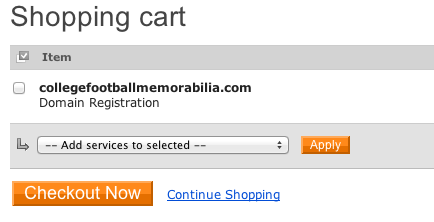
I hand registered a domain name a couple of days ago (CollegeFootballMemorabilia.com if you care to know), and I noticed that the only thing in my cart was this one domain name. There was no .CO domain name, .mobi free trial, or privacy protection automatically added to my shopping cart.

Since I was logged in to my account, I can’t be sure whether this was taken care of system-wide or if they simply removed those from my account, but whatever the case, it was nice to see them listen to feedback and remove this annoying speed bump.

Next time you check out at Enom, let me know if they are still adding it to your account. Hopefully, it’s something they changed for everyone and not just my account.