Subscribe

Here’s How GoDaddy LTO Looks to Buyers

GoDaddy announced it would allow sellers to give buyers the opportunity to choose a lease to own option for domain names listed for sale on its Afternic platform. The company gave sellers a lead time to implement the LTO option before offering it to customers searching to buy domain names.

Yesterday afternoon, the Afternic X / Twitter account shared that the LTO option is being rolled out to select buyers on GoDaddy’s website. I asked Paul Nicks, President of Domains at GoDaddy, if he can share how the LTO offer is presented to prospective buyers who search for a domain name.

GoDaddy to Offer Lease to Own via Afternic

One of the most helpful offerings from Dan.com is the easy to use Lease to Own (LTO) purchase option. Domain name buyers who do not want to spend the money to acquire a domain name at the time of the sale can opt to pay for it over a period of time when offered by the seller.

Dan.com was acquired by GoDaddy last year, and the LTO option is now coming to Afternic. This means domain name buyers shopping on GoDaddy will be given the ability to purchase a domain name over a period of time, if leasing is offered by the seller of the domain name.

Afternic posted a tweet about the new offering along with an article that covers how sellers will be able to add the LTO option to their domain names listed for sale via Afternic:

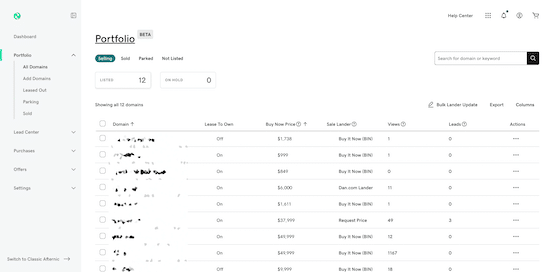
Delete Stale Dan.com Listings

When I read that all Dan.com BIN listings will be added to GoDaddy’s Afternic network, I didn’t see much of a downside for domain sellers. It means there’s more exposure for domain names for sale than what is received now. At second glance, this listing migration could pose an issue for many sellers, and at the least for me, will be a bit of a time suck.

I have never been great at deleting stale (old and no longer valid) listings from marketplaces. Up until last year, I didn’t use Sedo much, so Afternic and Dan.com were the only marketplaces where I had domain names listed with BIN prices. When I sold a name at Dan.com or in private, I would immediately delete the listing from Afternic.

When I sold a name at Afternic, I would remove it from Dan.com when I could remember to do that. My thinking was that nobody would find the Dan.com listing since the nameservers would change after it sold and it would redirect elsewhere. Since people generally find my Dan.com landing pages via direct nav, it wouldn’t be likely that anyone would see the names I had sold.


Don’t Blindly Authorize Domain Listings

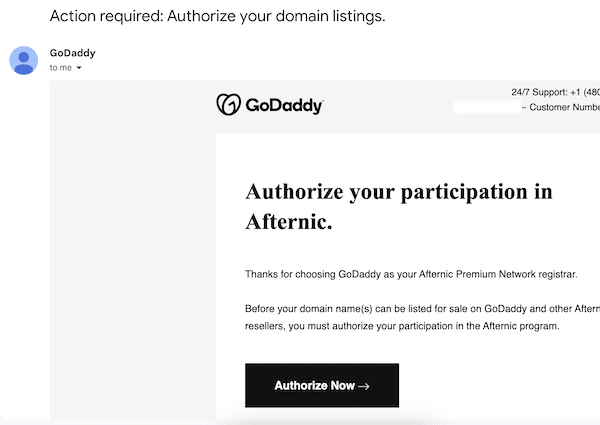
A few days ago, I received an “Action required: Authorize your domain listings.” email from GoDaddy. It listed several domain names I own that are listed for sale on Squadhelp. When I listed them on Squadhelp, I removed them from Afternic.

This email is the Afternic Fast Transfer authorization email. If the approval link is clicked, the domain name(s) will be opted in to Afternic’s Fast Transfer network. If the domain names subsequently sell via the Afternic network, they will be automatically removed from my account and transferred to the buyer.

Uni-Parked Domains Now “may be for sale”

When GoDaddy announced the Afternic to Uni transition, I was notified I would need to change any Uni-related nameservers I use. I was curious about what would happen to domain names utilizing the InternetTraffic.com nameservers that didn’t get changed.

Several domain names I previously sold maintained the nameservers I had been using after their sale. Obviously, the buyers of these domain names would not receive these notifications. I presume some wouldn’t care considering they did not update the nameservers on their own following their acquisitions.

Just Parking at Afternic? Here’s What To Do

GoDaddy recently announced the Uni to Afternic migration in March. I was not super happy about this, but I connected with Afternic to get some assistance with setting up the 25 +/- domain names I parked at Uni that earn PPC revenues. Some of these domain names aren’t really for sale (primarily due to the commission structure), but I preferred to try out GoDaddy’s parking option before seeking another solution.

On April 18, as directed, I set the nameservers to ns1.afternic.com ns2.afternic.com, and the domain names with traffic started showing up under the Parking tab in my Afternic account.

Several days ago, I noticed one name in particular wasn’t showing additional traffic or revenue. This was peculiar, and I thought there was some lag in reporting. I emailed GoDaddy over the weekend to see what is up with the reporting.

Before receiving a response this morning, I figured out what was causing the issue. The PPC parking page had disappeared. In its place was the landing page that said the domain name may be for sale. It’s pretty much the default landing page for when a domain name has Afternic nameservers but isn’t listed for sale in an account.

I followed-up this morning to report what I found, and a representative from Afternic told me what I need to do to resolve. I asked if the person could give an update I could share with others who may be facing the same issue as me, and here’s what I was provided: