Subscribe

Double Dose of Development Tips: Develop Complementary Sites & Use a Coming Soon Page

I want to offer you two separate development tips today, although they aren’t exactly related to each other. I have had very good luck with DogWalker.com, a site which now boasts somewhere around 80 paid/paying customers. As more and more companies signed up, I began to seek ways to scale this model.   $10-20k/annually is great revenue for a website like this, but it’s not exactly enough for someone to do full time – even if it grows at a 15% clip.

I thought about different ways to scale, and one idea I had was to acquire another domain name in a similar vertical. I wouldn’t want to cannibalize my listings by marketing a product that was too similar, yet I would want to offer something that was different, enabling me to have a cross-marketing opportunity. I sought out quite a number of names, and most owners were asking for more than I would be willing to pay – even knowing that the model would work. I finally came across CatSitter.com, and made the acquisition.

CatSitter.com will be a great complementary website, and it is going to make money. Not only does it get traffic (had 19 visits yesterday), but many companies that offer dog walking also offer cat sitting services and/or cat boarding. I also paid much less for CatSitter.com, and I can use the same platform as DogWalker.com, lowering my development costs. I can then pass the savings along to customers, in the form of a cross-marketing discount.

One of the smartest things I did after launching DogWalker.com was contact several large organizations and franchises to seek their assistance marketing to members/franchisees, and the largest pet care company agreed to do so. The result of this was that I have about 18 listings from one company’s franchisees throughout the US, and more franchisees sign up each day.   Many of these franchisees offer cat sitting services, and I already have commitments from paying customers on DogWalker.com who are waiting to pay for a CatSitter.com listing when the site goes live.

The second development tip I have today is somewhat unrelated, but it’s important. Despite the fact that CatSitter.com is making a bit of money at Parked, I have taken the parked page down and put a search engine optimized coming soon page up. I anticipate launching the site very soon, but I want the visitors to know there is something better coming. I stupidly forgot to do this several days ago, but it will be going up shortly.

Not only will this be used for lead generation in the meantime, it will also be used to show Google/Bing that something is coming after being parked for 8 years. When I did this with DogWalker.com for 3 weeks, I had 3 inquiries (plus 3 or 4 sale inquiries), and the site launched as a PR1.   Although there will be less time in between the coming soon page and the site for CatSitter.com than there was for DogWalker.com, it’s still something I am going to do and would advise you to do.

Well, that’s it for me for today. Hope these tips were helpful!

Follow Along as a Category Killer Domain is Built from the Ground Up

I’m not writing this post because Rick sent me bottles of wine.   I am writing this post because I think we all have a great opportunity to observe the launch of a new brand on a generic domain name – Vino.com. By following the progress of this company from its infancy, I think we can all learn quite a bit for our own projects.

Over the coming weeks and months, keep your eye on site changes.   Do Google searches to see how rapidly pages get indexed by searching site:vino.com. See how the pages rank for competitive terms like “wine of the month club,” “wine club,” “vino,” and other related search terms.   See how Rick and his team go about building and getting back links for the site by searching for link:vino.com in Yahoo Site Explorer.

You might even consider signing up for the service. For $69/month, you will get some unique wines, but more importantly, you can see what offline marketing efforts Rick and his company are making to promote their brand. As a wine of the month club, the hope is that people won’t cancel their subscriptions, so you can see what they are doing to keep membership active.

It’s not often that we have the chance to follow a start-up, but Rick has given us this opportunity.   As much as its important to follow the success of Vino.com, it will also be great to learn insight about how an entrepreneur builds a business on a great generic domain name. Rick announced that Latona’s has launched a consumer products division, and that is going to be interesting to follow as well.

I recommend these things to follow along as Vino.com grows:

  • Join the newsletter
  • Test the customer service
  • Navigate the site
  • See SEM efforts in Google and Bing
  • Sign up for the club

My hope is that Rick will share some insight into the site’s growth. It would probably be in his auction company’s best interest to show how an entrepreneur can take a generic domain name and build a business on it.

Using All in One SEO Plugin

I have the All in One SEO plugin installed on all of my WordPress websites. It’s a free plugin from Semper Fi Web Design that makes the process of SEO much easier and automated. However, up until today, I wasn’t really harnessing the power of the plugin on my websites.

For most of my sites, I was basically using the default settings that come with the plugin. Each post/page title would be listed as the article title, and I didn’t add a meta description sentence for individual posts. I figured Google and Yahoo would be smart enough to pick up the content and rank it accordingly.

Although it’s worked fairly well, it’s silly not to use this plugin to its fullest. From here out, I plan to add a different page title and description instead of the default, which was the post title and the first 160 or so characters of the post. Usually that would be a lead in, but not really the meat of the post.

Over the next few months, I will monitor the percentage of my traffic that comes from search to see if it increases as a result of my efforts. With many people using WordPress for various websites, blogs, and mini sites, it doesn’t really make sense not to install the All in One SEO plugin – and once it’s installed, it’s silly not to use it.

Problem with WordPress Upgrade

Wordpress LogoI think about 50% of my websites are built on the WordPress platform, while I use Dreamweaver for the others. I am not a programmer, and at best, I am a novice developer, so I like WordPress because it’s easy to operate. One of the best aspects of WordPress can also be one of the most frustrating. Whenever WordPress rolls out a new version, or a plugin is upgraded, WordPress lets the publisher know that the newest version is available.
The notice is in a spot to ensure that people upgrade, since security patches are generally a big component of upgrades. It isn’t distracting, but positioning of the notice makes you feel like it’s very important to install the new version, whether it actually is critical or not. All you need to do is click the “Please upgrade now” notice, and you are taken to a page where you can easily upgrade to the newest version with the click of the mouse. Sounds simple, but it can cause major headaches for you.

With a custom designed website residing on the platform, an upgrade that goes wrong can lead to problems, which aren’t always obvious. Despite having an issue a few months ago that was the result of an upgrade gone wrong, I decided to take a chance and upgrade to WP 2.9. I had recently backed-up the entire site, so I figured it wouldn’t be a big deal if things went haywire.

The day after upgrading, I found that a post missed the schedule, which was an issue that happened last time. I did some testing (changing to the default theme and turning off the plugins), and I had the same issue. I got in touch with my designer, and he did a bit of research on the issue. Luckily for me, he found a thread on the WordPress Support Forums, where several people complained of the same issue. In a few minutes, my designer found the potential solution, which worked for my site.

The same type of WordPress problems can exist with a plugin upgrade, patch installation, or other WordPress upgrade. Before you are tempted to upgrade, make sure you back-up your full website. If you do run into a problem, do a Google search to find others with the same problem so you can either diagnose it or find someone who can diagnose it and remedy it for you. It’s great that WordPress makes it easy to upgrade, but it can cause you problems if things don’t work out as expected.

Guest Post: Craig Rowe on Setting Up a Network of Domain Names on WhyPark

Elliot contacted me looking to quickly setup 54 long-tail domains on WhyPark relating to real estate agents and home loans in different cities. The objective was to include content relevant to the subject and/or city being targeted, develop new traffic and revenue that doesn’t currently exist on these domains, and generate domain sales leads.

The following is a quick overview of how the domains were setup on the WhyPark platform, followed by some thoughts on how to help these domains attract visitors from related sites and search engines.

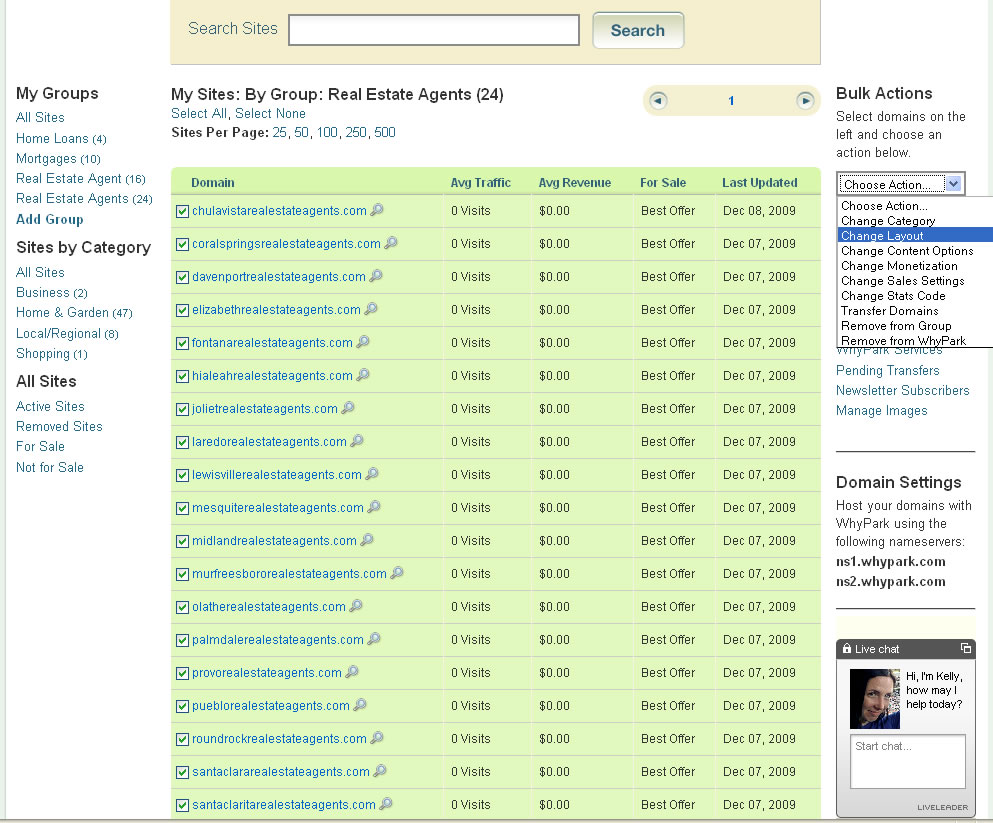
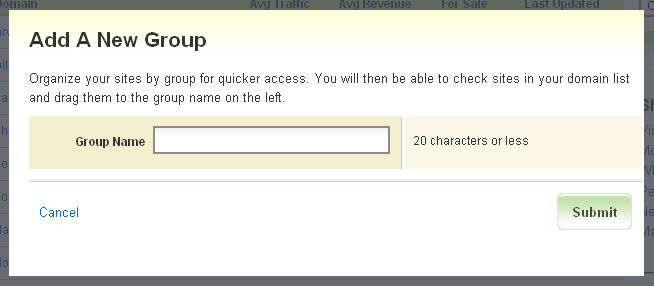
Step 1: After logging into Elliot’s WhyPark account, I created the following groups to easily manage the domains:

  • Real Estate Agent
  • Real Estate Agents
  • Mortgages
  • Home Loans

step1

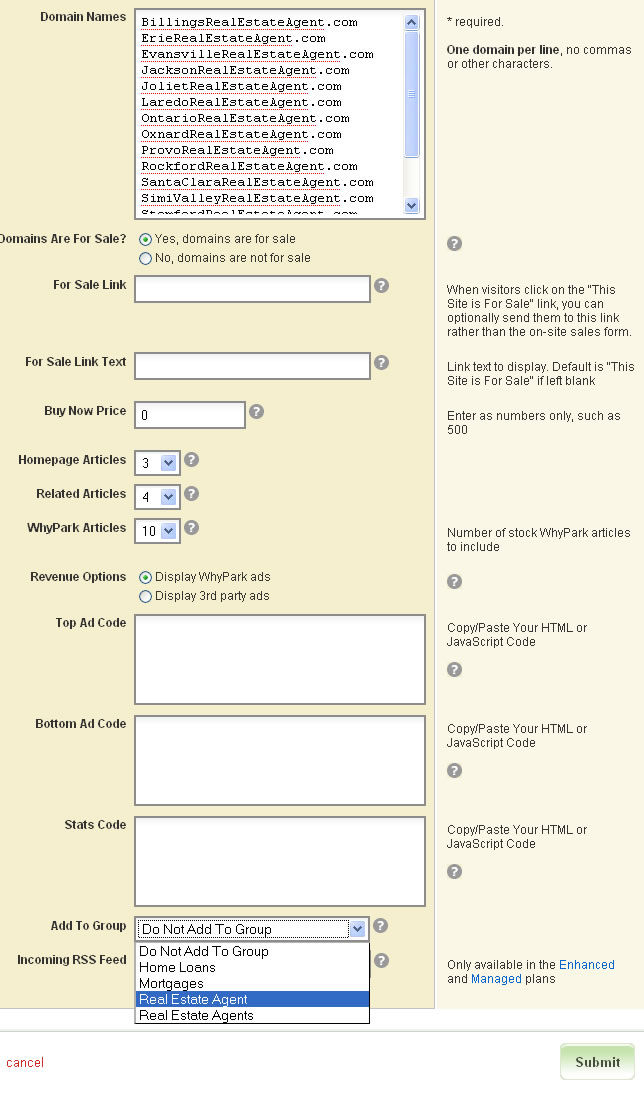
Step 2: I copied each group of names from the list sent and used our “Bulk Add Sites” to quickly add the domains to each group with the same settings. Since one goal is to attract end-user sales, I’ve selected that the domain is for sale. That will automatically add the “for sale” link on each domain and also the inquiry form for buyers to easily contact Elliot.

step2

Step 3: I let the bulk import do its magic for a few minutes while it does the following:

  • Splits the domain names into keyword rich site titles (coralspringsrealestateagents.com to “Coral Springs Real Estate Agents”)
  • Creates keyword lists to be used in article matching
  • Creates relevant Related Search terms that will lead to pay per click revenue through the top-tier advertising feed.
  • Writes a quick meta description by integrating the most popular terms for the domain
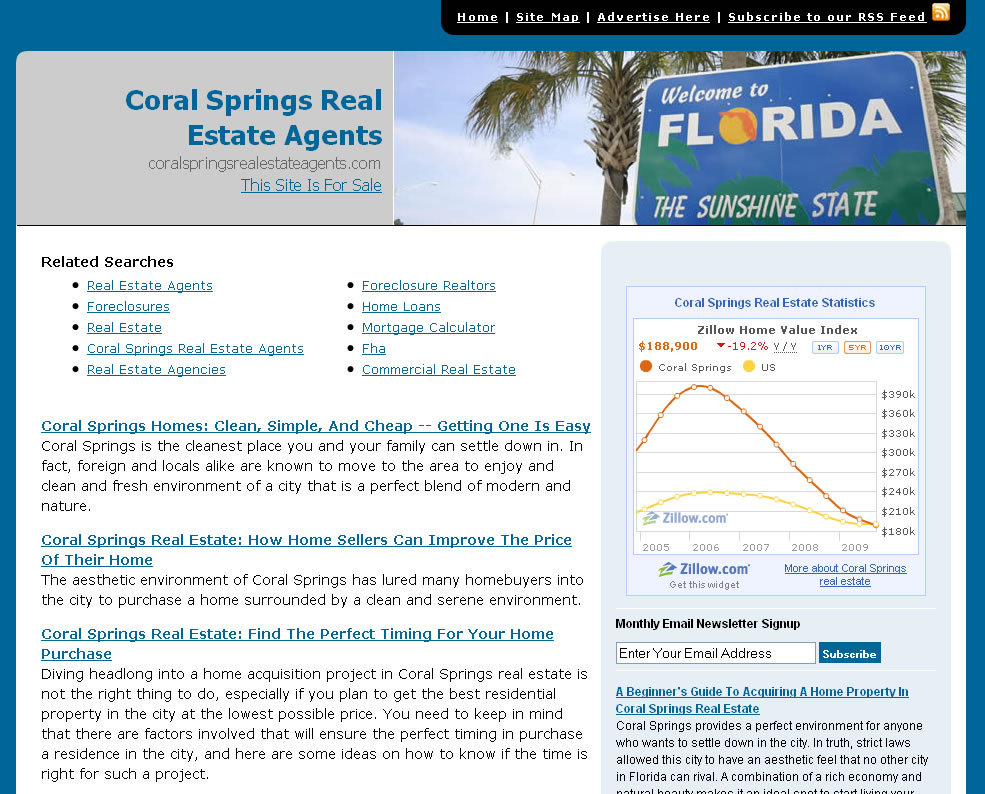
  • Categorizes the domain and assigns a template/image.   For example CoralSpringsRealEstateAgents.com has been automatically assigned a “Florida” image.   Others like ShreveportRealEstateAgents.com were assigned an image specific to Shreveport.   WhyPark currently has over 4,000 images, adding several hundred new images for our templates weekly.

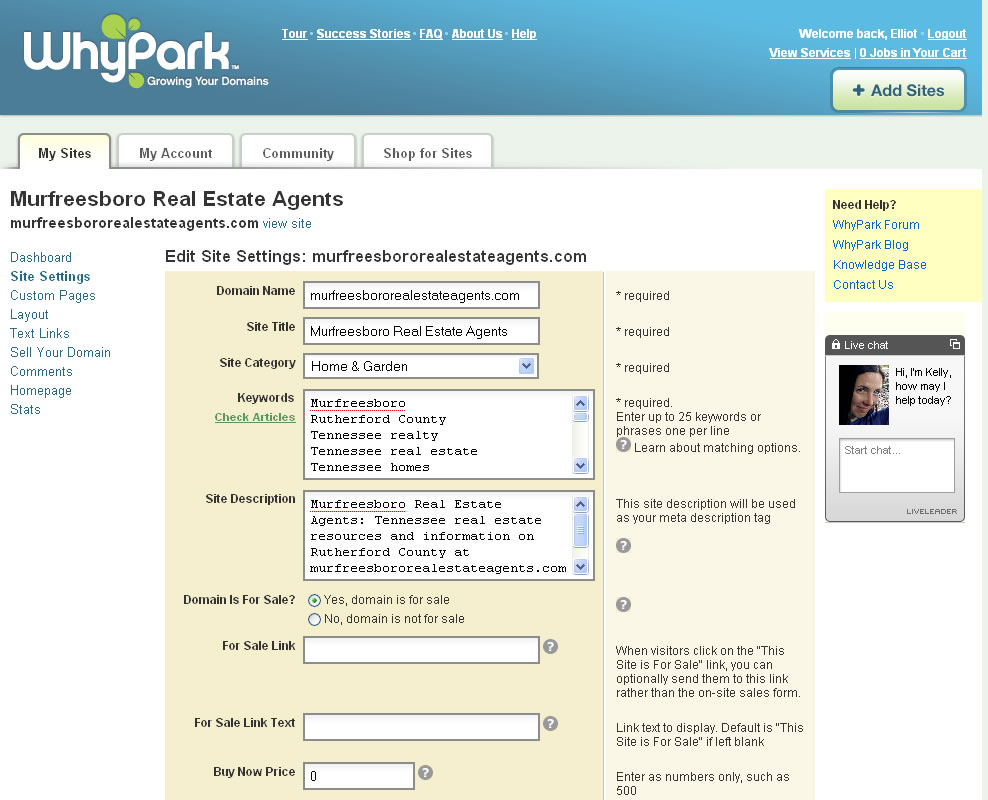
Step 4: Our bulk import tool is usually very accurate on matching keywords with domains having multiple keywords and phrases.   However, we might not always have stock content for highly focused phrases or small geographic areas.   So, I’ve reviewed the domains and when needed, tweaked the keyword list to ensure that we have focused content about the domain name’s theme along with content that a user would expect when they land on the domain.

For instance, we might not have much content specifically about a phrase like “Murfreesboro Real Estate Agents”.   However, we do have content relating to the city of Murfreesboro along with related real estate areas like Tennessee.   By updating the keywords, we’ve been able to provide a good mix of real estate related content about Murfreesboro and surrounding areas.

step4

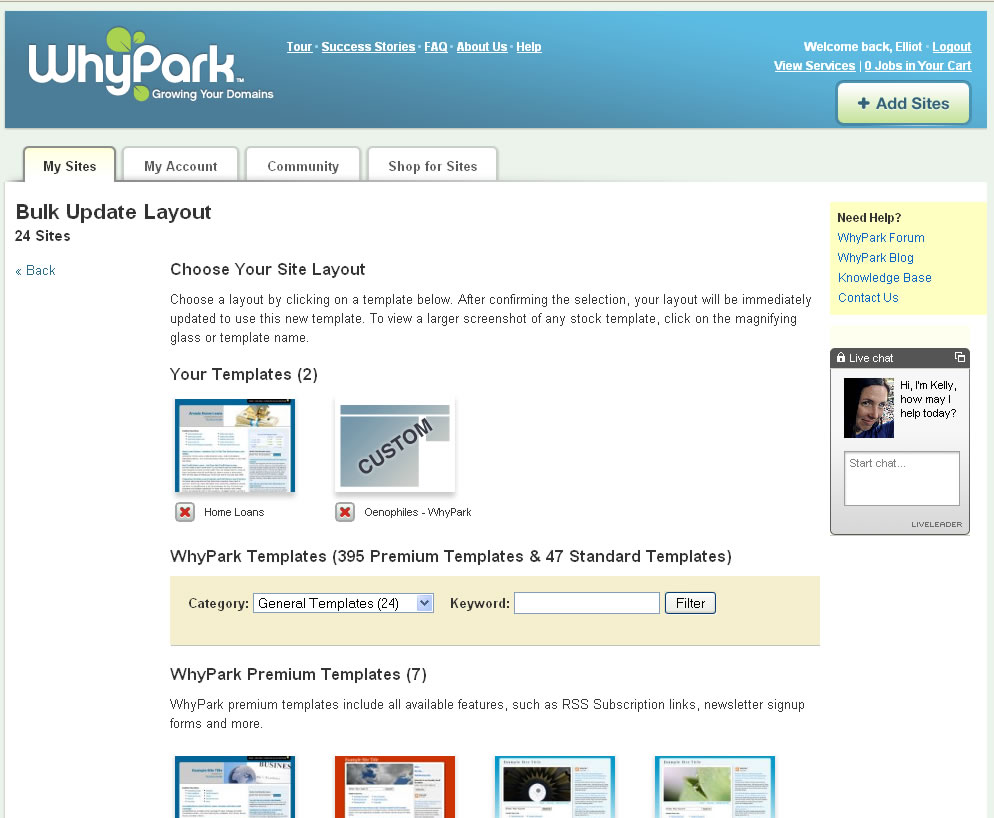
Step 5: Choosing a Template:   By default, we assign a template to each domain as it’s imported, mixing in a few different templates for variety.   In this case, we’re going to choose one template we created that has a wider column on the right to accommodate widgets from Zillow.com.   I’ve clicked on the group of names called “Real Estate Agents”, selected all domains in that group and chose to update the layouts in bulk.   I then chose the template from Elliot’s saved, custom template gallery which applies the layout to each of the domains in that group.   I’ve repeated the process on the domains in the “Home Loans”, “Mortgages” and “Real Estate Agent” groups.

step5


step5b

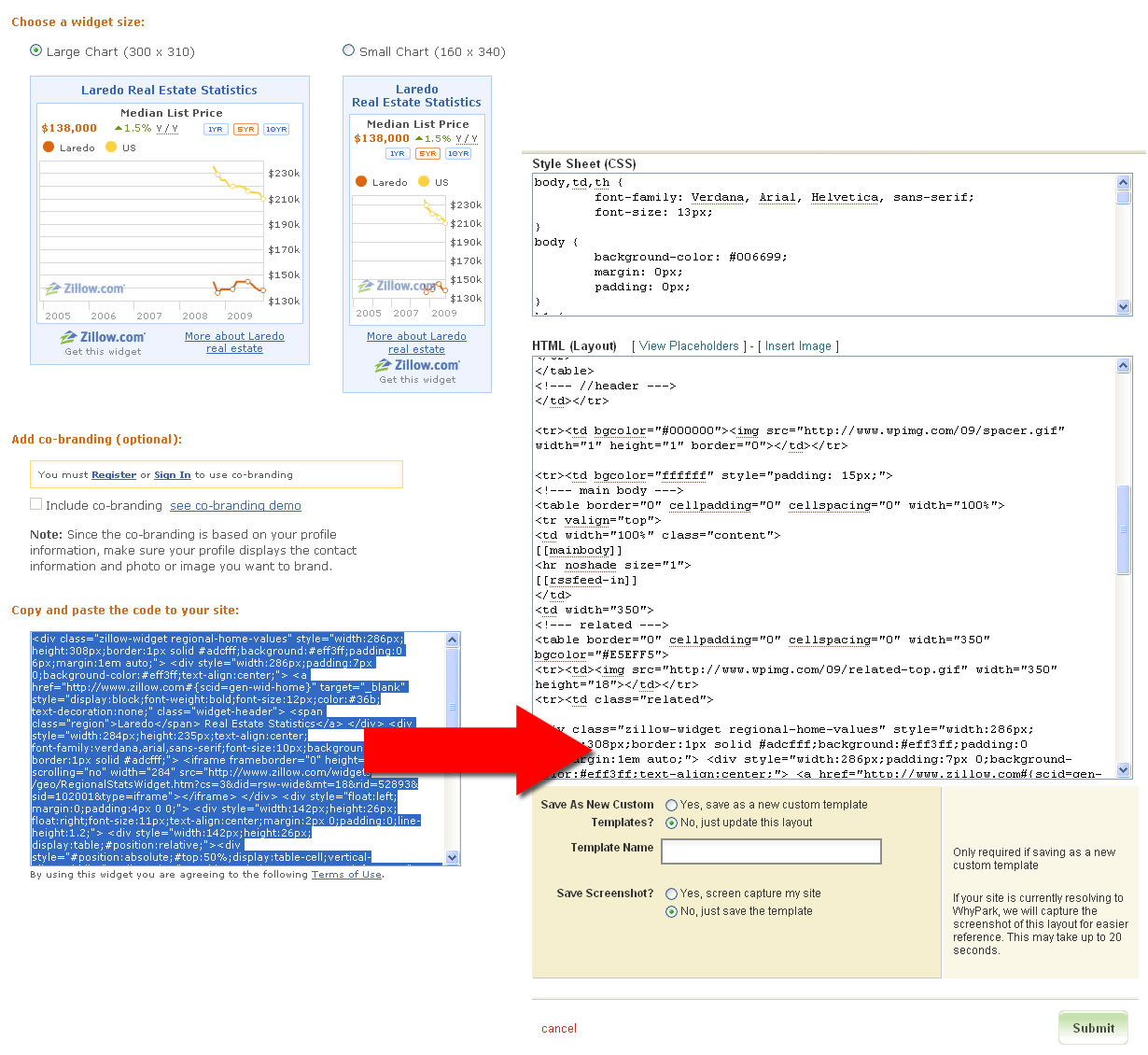
Step 6: Elliot asked to include widgets from Zillow.com on his real estate and mortgage sites.   To do so, I went to the widget section on Zillow’s site.   For each city, I generated a city-specific widget and copied the code.   I then pasted that code into the HTML of the layout on WhyPark.   This customization does require some basic understanding of HTML to determine where to paste the code in the layout.

step6

Step 7: I asked Elliot to update his DNS to point to our servers and all 54 domains went live.

step7

Moving Forward

The WhyPark platform focuses on matching the most relevant content that we’ve licensed from many sources. While we try to make it as easy as possible to turn your domains into active, relevant sites, it shouldn’t be misunderstood that this will be a free ticket to the top of every search engine. WhyPark provides a number of tools, so you can import RSS feeds, customize your design, add an unlimited number of custom pages, update your home page, and much more.

It’s also always recommended to start working on getting links from quality sites that are related to the domain you’re optimizing. Search engines place a large amount of value on the quality and types of incoming links your site has. The beauty of having developed sites is that you can immediately start working on getting new links to build trust and create new sources of traffic and revenue.

“I Have a Great Business Idea”

“I have a great business idea! I was eating marshmallows and pretzels at the same time yesterday, and it dawned on me. Marshmallow covered pretzels – tadah! I bought the domain name MarshmallowCoveredPretzels.com, and I think there’s a great business idea. I need your help to make it happen…”

I am excited for people when they call or email me telling me they have a great business idea and the matching domain name. It’s great when people take initiative to start their own business online. There are many advantages to it, but if you’re reading my blog, I am sure you are already aware of them.

However, I am probably the wrong person to speak with about building your business idea into an actual business – especially if you aren’t planning to make it your complete focus. I am a domain investor first and foremost. I acquire domain names because I believe the value is greater than I am paying. On 90% of the domain names I acquire, my primary objective is to sell it for more than I paid, and most of the time that involves a quick sale.

A domain name can be a great start for an online business, but it’s just that – a start. You need to have a solid business plan to go along with your domain name, and that doesn’t include the financial backing that some projects need or the person behind it who is determined to make it happen. There are a lot of people with good ideas and nice domain names. It takes a lot more than that to build a business.