Subscribe

Brad Larson Leaves Executive Accounts Group at Go Daddy

12

In July of 2006, well before I had my blog and after I had been working with a couple of good account managers at Go Daddy, I received an email from Brad Larson that said in part, “It’s my desire to continue providing you with exceptional service and support that you have become accustomed to in your relationship with GoDaddy.com.”

Over the past seven years, Brad far exceeded my expectations for an account manager, and he was my point person whenever I had any issues at Go Daddy, even if they had nothing to do with account management. Brad is a masterful communicator, and he handled my account as if it was his only account. From what I understand, his other clients felt the same way about Brad.

I recently learned that Brad is

Update: Rallying Cry “Boston Strong” Domain Name Listed for Sale on Go Daddy

Boston Strong

Since the Boston Marathon tragedy, the term “Boston Strong” has been the unofficial rallying cry for those showing support for the city of Boston and everyone touched by the bombings. The Red Sox had a Boston Strong uniform in their dugout last night, and a variety of Boston Strong shirts are showing up for sale.

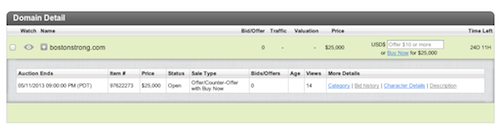
BostonStrong.com is a domain name that has been registered to a Vermont resident since November of 2012. It appears that this person also registered other extensions of this domain name this week, including the .net, .org, and others. BostonStrong.com forwards to Brick-Skins.com.

When doing a Whois lookup on the domain name, I saw that

Go Daddy Founder Visits Haiti to Help Earthquake Victims

1

No matter what your personal views of Go Daddy founder Bob Parsons are, I think we can all agree that he is philanthropic and he uses his money and clout to help those in need.

I want to share a video from Bob Parson’s blog, which chronicles his visit to Haiti to help victims of the massive earthquake that caused catastrophic damage. On this trip, Mr. Parsons meets with some of the people who are still impacted by the earthquake, and he also meets with some of the people who are helping those in need.

For quite some time, Go Daddy gave customers

Go Daddy’s MBA Marketing & Sales Internship is a Great Opportunity

2

GodaddyI don’t post about job opportunities in the domain space too often, but this Go Daddy marketing internship looks like it’s going to be a great opportunity for a MBA student with a marketing focus. The MBA Marketing & Sales Strategy internship at Go Daddy looks like a great chance to get experience in this dynamic industry.

In this position,

Porn Stars Without Makeup Going Viral – Matching Domain Name is Cheap

There’s a series of photographs called “Porn Stars Without Makeup” making their rounds on the Internet today. I’ve seen it several times on various sites – from Barstool Sports to the New York Post. In case you haven’t see it, the series is a bunch of photographs of pornstars without makeup compared to photos of them with makeup.

I am not exactly sure why it’s become such a hot topic, but there are many searches for it as well as mentions on Twitter, so there’s clearly interest.

As of right now, the matching domain name, PornStarsWithoutMakeup.com is listed for sale on Go Daddy with a purchase price of just $280. The domain name is privately registered, and it has a creation date of December 2011, so it’s probably a series that existed before but caught fire very recently. The domain name is currently parked at InternetTraffic.com, although it doesn’t have a traditional “for sale” link on the top of the landing page.

I haven’t bought adult names in a while, but a $280 investment seems pretty cheap for a hot topic keyword domain name. I don’t know the owner of the domain name, but my guess is that it’s not going to be available for long if you want to take a chance and grab it.

Go Daddy Guest Post: How To Protect Your Accounts

Go Daddy CISOThis is a guest post from Go Daddy’s Chief Information Security Officer, Todd Redfoot. In the post, Todd discusses how you can keep your accounts protected and your domain names safe.

Knowing that an outside party accessed one of your accounts can be incredibly frustrating and exhausting. But there are practical steps you can take to protect your accounts and the information you store in them.

7 basic ways you can make sure your accounts stay secure:

  1. Use a strong password. Eight characters is really not sufficient, a strong “passphrase” is the better choice. A creative device to help with generating strong passwords is to use a phrase that has special meaning to you. For example, “I need a strong password to make sure I’m completely secure,” could become the password InaspTmsIc$. Passwords should consist of a minimum of nine (9) characters and contain at least one special character.
  2. Change your password – often.  This can be as simple as setting a reminder on your calendar to change your password at the beginning of every month.
  3. Use a variety of passwords.  You should never use the same password for multiple accounts. It simply makes it easier for hackers to access all  of your accounts. If you find it difficult to remember all these crazy passwords – try a password safe. There are many free ones out there that will safely store all your passwords in an encrypted database on your machine. Make sure you do your research before downloading anything you find on page 1 of a Google search.
  4. Always, always, always log out.  This is particularly true if you’re using a shared computer, such as one at work or in an Internet café. Regardless of the account you’re in, Facebook or Wells Fargo, take this precaution every time.
  5. Make sure your account is up to date.  Some digital spring cleaning can also protect you. Remove expired credit cards you have stored in accounts and make sure your phone number and address are correct. Not only does this make your account secure, it also ensures that companies you do business with can contact you if there’s ever an issue.
  6. Beware of Wi-Fi hotspots.  Sure, they’re convenient. But you shouldn’t use them to access secure accounts. Hackers are known to roam hotspots looking for their next victim.
  7. Protect your PC. Be careful what you download – only use trusted, well-vetted sources – and invest in anti-virus software to keep your computer safe.

When you have done “everything”, what else can you do?

  1. Do the 2-Step.  Two-step authentication adds another layer of security by texting you a validation code to enter whenever you log in or make important account changes. If it’s available to you, take advantage of it. Go Daddy offers two-step authentication in the US and Canada. You can find out more information about it here.
  2. Never share your account with others.  By giving others access to your account, or purchasing products with someone else’s payment method, you are giving them full access to your account details. If you need to delegate management of your resources check to see if you can assign permissions via account management settings. Go Daddy provides “Account Administrator” functionality. This allows management of your resources from separate accounts, limiting direct access to  account details and billing information. Read more here.
  3. Check for keyloggers on your computer.  Your computer might have malicious software, known as keyloggers, installed that records every keystroke you make — including your user names and passwords.   Run anti-virus programs regularly to detect keyloggers. We recommend using your favorite search engine to find software that removes key loggers from your computer.
  4. Don’t fall for a phishing scheme.  Cybercriminals look to create a sense of urgency to trick unsuspecting victims into downloading malicious files. Many attackers try to lure  you into their schemes by sending emails that look legitimate, but include links to fake login pages that closely resemble the legitimate website. Hover over links, check for misspellings (acmebnak instead of acmebank), but don’t click. Go directly to the website and log in as you would normally; any message, important action, etc. will be there if the email is legitimate. Emails from Go Daddy, in most cases, include your first and last name, a clear first indicator of legitimacy.

Protecting you data is as critical as locking your car or your house – don’t give an attacker an easier route by using weak passwords or unsafe networks.